
How to play
Everything you need to play Conquer Europa, step by step. The pictures are from a real match. Each one has red numbers on it, and the list under the picture says what each number is. Click a picture to see it full size.
1. The goal
It is 1936. Every country in Europe is on the map, and you lead one of them. A match has two players or more, up to one for every country. Every country that nobody picked is played by the computer.
There are two ways to win:
- Hold 55% of all the provinces in Europe at the same time. That is 738 of the 1,341 provinces. You win straight away.
- Or hold the most provinces on 1 January 1940, the day the match ends.
Land you have taken in a war counts as yours for both.
Time. One second is one day in the game. The match runs on its own and never pauses, so a whole match lasts about 24 minutes. Things happen while you think, so keep your eyes open.
If your country loses its last province, you are out of the match. You can keep watching until the end.
2. Joining a match
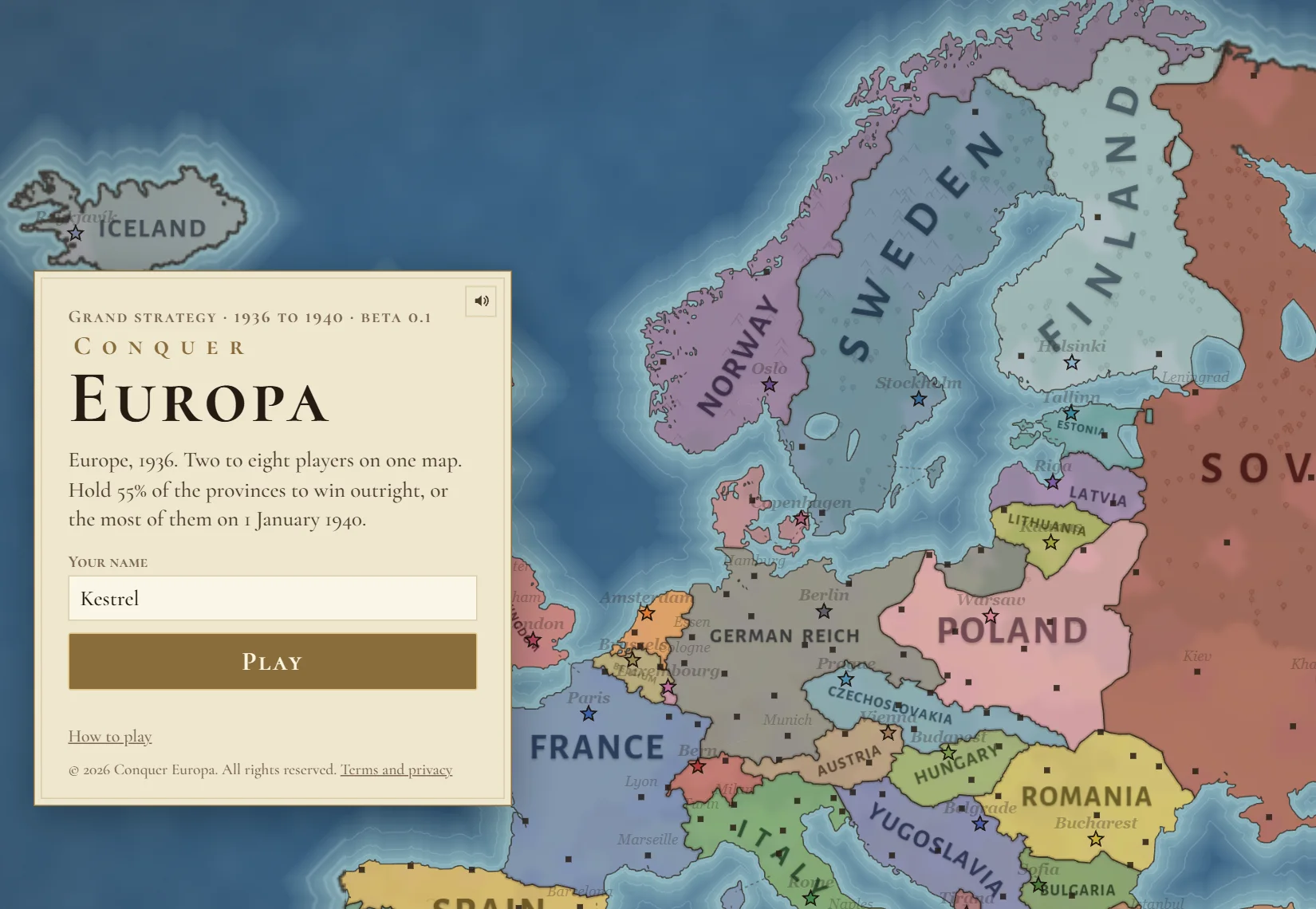 1234
- Your name. Letters only (A to Z), with one underscore at most and 10 letters at most. No spaces, no numbers, and nothing rude or hateful. If someone in the lobby already has your name, pick another.
- Play puts you in a lobby, where the players of the next match gather.
- How to play opens this page.
- Terms and privacy: the rules of the site and what we keep about you.
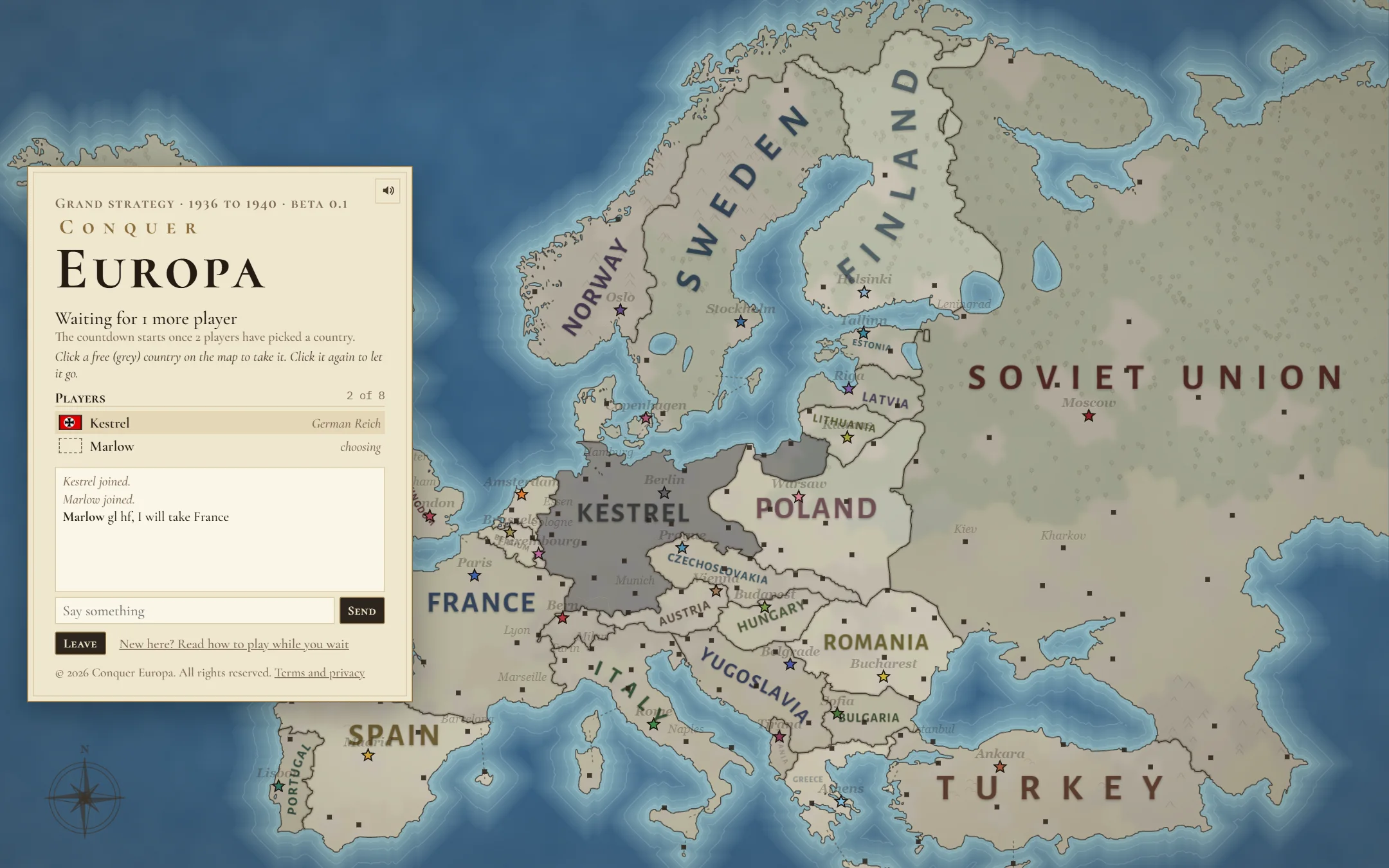 123456
- The countdown. It starts once two players have picked a country.
- The hint. It tells you what to do. You can change country as often as you like, but if you change it 5 times within 15 seconds you must wait 5 seconds. Keep doing that and the wait doubles each time: 10, 20, 40, and at most 60 seconds. A calm minute resets it.
- The players in your lobby and the country each one picked. "Choosing" means they have not picked yet.
- The chat. Type below it and press Send. When the match begins, it carries on as the match chat. Write too fast and you are muted for 5 seconds; keep at it and the mute grows to a minute, then longer.
- The map. Grey countries are free. Click one to take it, and click it again to let it go. A country someone has taken shows their name.
- Leave takes you back to the menu.
The lobby card covers part of the map. The small arrow on its edge slides it out of the way, and the same arrow brings it back. On a phone held upright the card slides down instead. A red dot on the arrow means someone wrote in the chat.
How the countdown works
- Until then, "Waiting for players" shows in the middle of the map, with how many players have picked a country.
- With two players it starts at 3 minutes.
- Each new player makes it shorter, and by more each time: the third player takes 30 seconds off, the fourth 45 seconds, the fifth a full minute, and so on.
- It never drops below the last 30 seconds. In those last 30 seconds a big countdown appears over the map.
- A lobby holds one player for each country, so up to 30. Anyone still without a country when the countdown ends is given a free one.
- If every game server is busy, your lobby waits and starts the moment one is free.
- If you stay in a lobby for 3 minutes without picking a country or chatting, you are removed.
3. The game screen
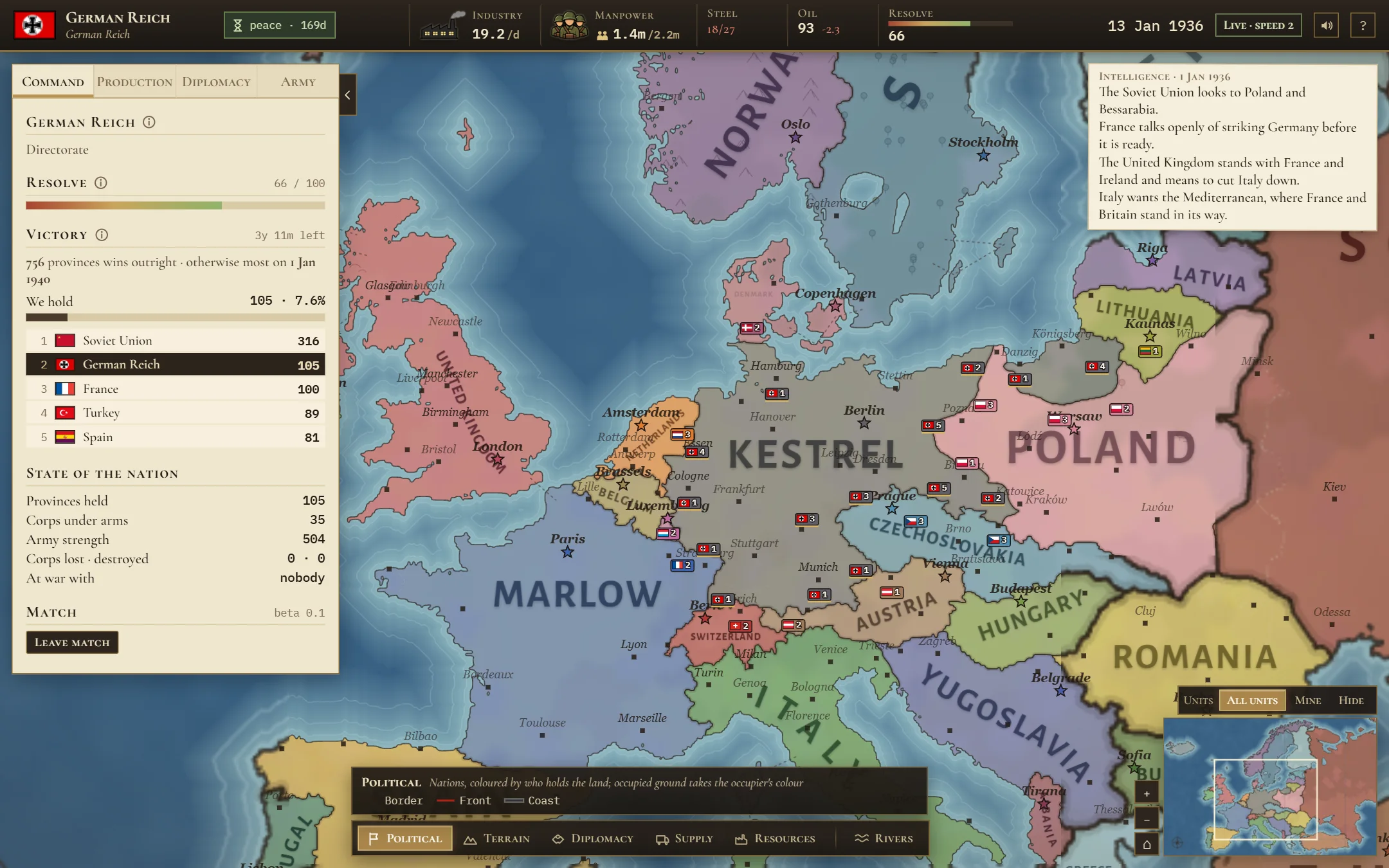 1234567
- The top bar: your country, your resources and the date. See the next part.
- The tabs: Command, Production, Diplomacy and Army.
- The side panel shows the open tab. The small arrow on its right edge hides it, and so does the Tab key.
- The map. Your country carries your name in big letters. Stars are capitals and dots are cities.
- Map modes change what the map shows. See Map modes.
- The minimap. Click it to jump there. The plus and minus buttons zoom, and the house button takes you back to your country. Above it, Units chooses which armies are drawn: all of them, only yours, or none.
- Reports: news from your country and the world. They fade away after a few seconds.
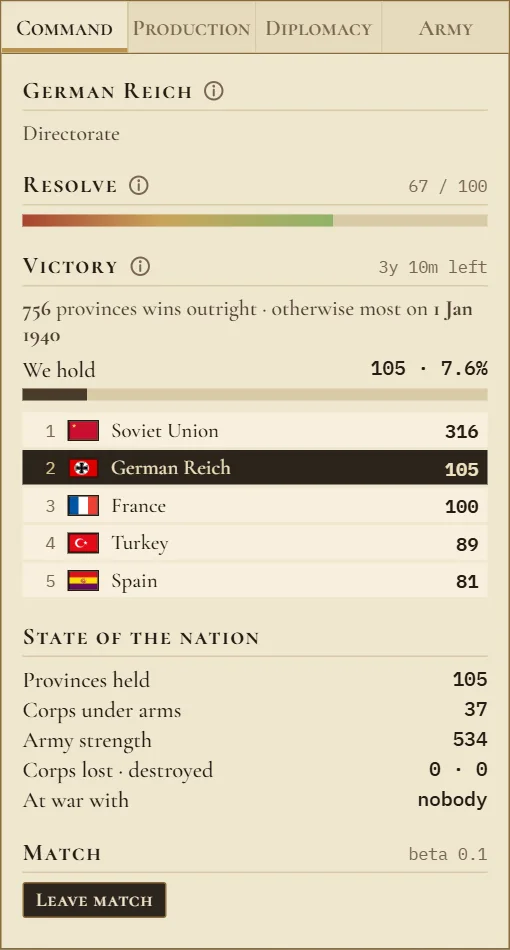 1234
- Resolve is your nation's will to fight, from 0 to 100. Lost land, lost corps and long wars wear it down. Taking land lifts it. At zero your armies still fight, but weaker. You never surrender unless you choose to.
- Victory: how many provinces win the match, how many you hold, and the five countries in the lead.
- State of the nation: your provinces, your corps, your army's strength, corps lost and destroyed, and who you are at war with.
- Leave match. Careful: you cannot come back, and the computer takes over your country.
4. The top bar
 1234567891011
- Your flag and country.
- The peace clock. Every match starts with six months of peace. Until 1 July 1936 nobody can prepare a war or declare one. This shows the days left.
- Industry: the points your factories make each day. They pay for your army and grow your country.
- Manpower: the men free to join the army, out of your ceiling. Click it to change your conscription law.
- Steel: the steel you have, out of what your factories need. Too little steel slows your industry.
- Oil: your stock, and how much it changes each day. Armored corps burn oil.
- Resolve, as above.
- The date.
- Live: online matches always run at speed 2 and never pause.
- Sound: music and effects.
- Help: a short guide inside the game. F1 opens it too.
Just before Sound there is a speech bubble button: the match chat. Click it, or press Enter, to talk with everyone in your match. It carries on from the lobby chat, so you can see what was said there. A red number on it counts the lines you have not read yet. Esc closes it.
Signs that appear only sometimes
 1
- Crossed swords (1 above): you are preparing a war goal. It shows the target and the days left. See Diplomacy and war.
- An envelope with a number: other countries have sent you offers. Click it to answer them.
- A pulsing warning sign: another country is preparing a war goal against you. Click it to see who, and when they can attack. A warning sign also appears over their capital on the map.
5. Moving around the map
- Drag the map with the mouse, or use the W A S D keys or the arrow keys.
- Zoom with the mouse wheel, or the plus and minus buttons by the minimap.
- Zoomed far out, armies become small markers: one for each country in each area.
- On a phone, drag with one finger and pinch with two to zoom.
- Click a province, with no armies selected, to open its card.
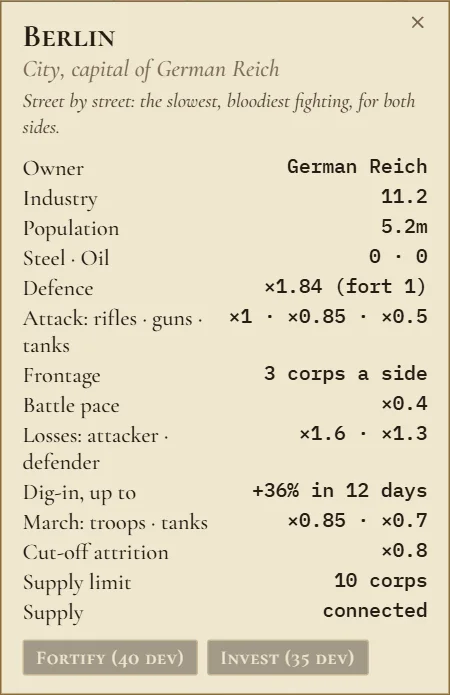 12
A province card shows who owns it, its industry, its people, its steel and oil, and what its ground does in a battle: how much it helps a defender, how many corps can fight there at once, and how many corps it can feed. It also says whether it has supply.
- Fortify builds a fort with your development fund, up to 4 levels. Each level makes the province harder to take.
- Invest spends 35 development to add industry: one point in a city, half a point anywhere else.
Both stay grey until your development fund has enough. See Production.
6. Your armies
Your army is made of corps. All the corps standing in one province form a stack, drawn as one token on the map.
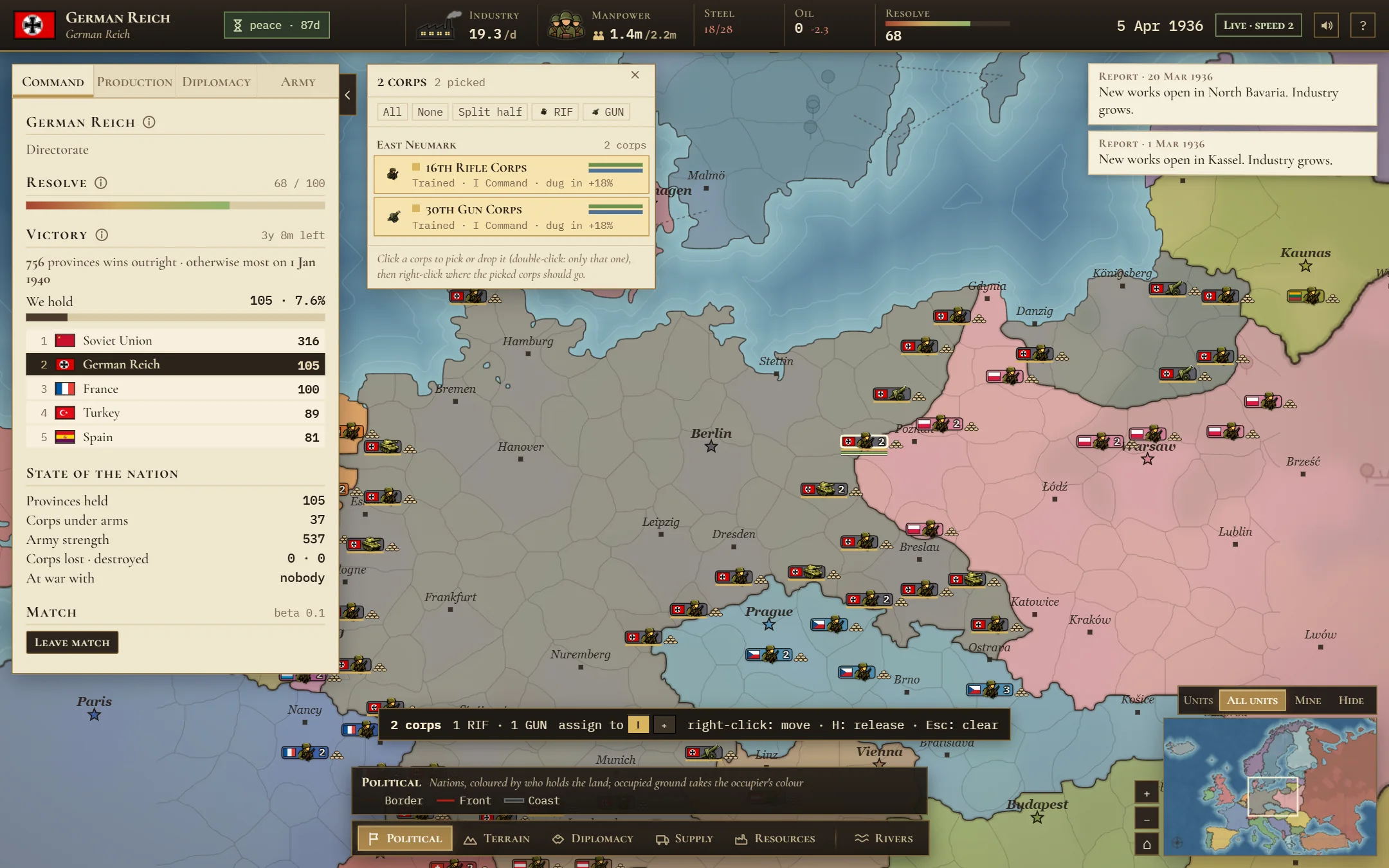 1234
- A selected stack. It lights up. Its token shows the flag, a symbol for the kind of corps, and how many corps stand there.
- The stack panel lists every corps in the stack with its rank, its command, and its strength and organisation bars. Click a corps to add it to your selection or take it out. All, None and Split half help you divide a stack.
- The selection bar: how many corps you picked, and the buttons to put them in a command.
- Sandbags beside a token show how well dug in the corps are: 1, 3 or 6 bags. Corps that stay still dig in, and dug in corps are much harder to beat.
Reading a token
- A soldier is a Rifle Corps, a field gun is a Gun Corps, and a tank is an Armored Corps.
- The number is how many corps are in the stack. No number means just one.
- The two thin bars under it are strength (green) and organisation (blue).
- The colour of the token says whose side it is on: green for yours, cyan for an ally's, red for an enemy's and grey for anyone else's. The flag says which country. To colour each token in its nation's own map colour instead, press Nation in the units bar at the bottom right, or press C.
Giving orders
- Click a stack to select it. Hold Shift and click to add more. Hold Shift and drag to draw a box around many stacks. Double click a stack to select its whole command.
- Right click a province to send the selected corps there. If you are at war with the country that holds it, they attack it.
- Corps you move by hand go back to their command when they arrive. Press H to take them out of their command, so they stay where you put them.
- Esc clears your selection.
- On a phone, tap a stack, then tap where it should go.
The three kinds of corps
| Corps | Cost | Men | Attack | Defence | Speed | Good at |
|---|---|---|---|---|---|---|
| Rifle Corps | 40 | 25,000 | 10 | 15 | 20 | holding a line, cheap and tough |
| Gun Corps | 55 | 20,000 | 19 | 9 | 18 | breaking a defence |
| Armored Corps | 90 | 15,000 | 25 | 11 | 38 | fast attacks on open ground; burns oil |
Cost is in industry points. Every corps also costs a little industry each day to keep.
What keeps an army alive
- Strength and organisation. Strength is how many men a corps still has. Organisation is how ready it is to fight. Battles drain organisation first. A corps that loses a battle falls back; it is not destroyed. Corps in supply slowly refill their ranks with new men.
- Experience. Corps learn by fighting and climb through five ranks: Green, Trained, Regular, Veteran and Elite. Each rank hits harder, loses fewer men and keeps its order longer.
- Supply. Your corps get food and ammunition through your own land, back to your cities. Corps cut off from supply show a red triangle. They cannot refill and slowly starve.
- Crowding. Each province can only feed so many corps: 8 on plains, 6 in forest, 5 in hills, 3 in mountains or marsh, and 10 in a city. Put more there and their organisation drains and no new men reach them.
- Surrounded. A corps with no friendly province next to it is besieged. It gets no new men and can be forced to surrender. A corps is only ever destroyed when it is surrounded or starving.
- Ground and rivers. Hills, mountains, forests, marshes and cities all help the defender and slow armies down. Tanks struggle most in rough ground. Attacking across a river is harder and slower.
7. Battles and the front
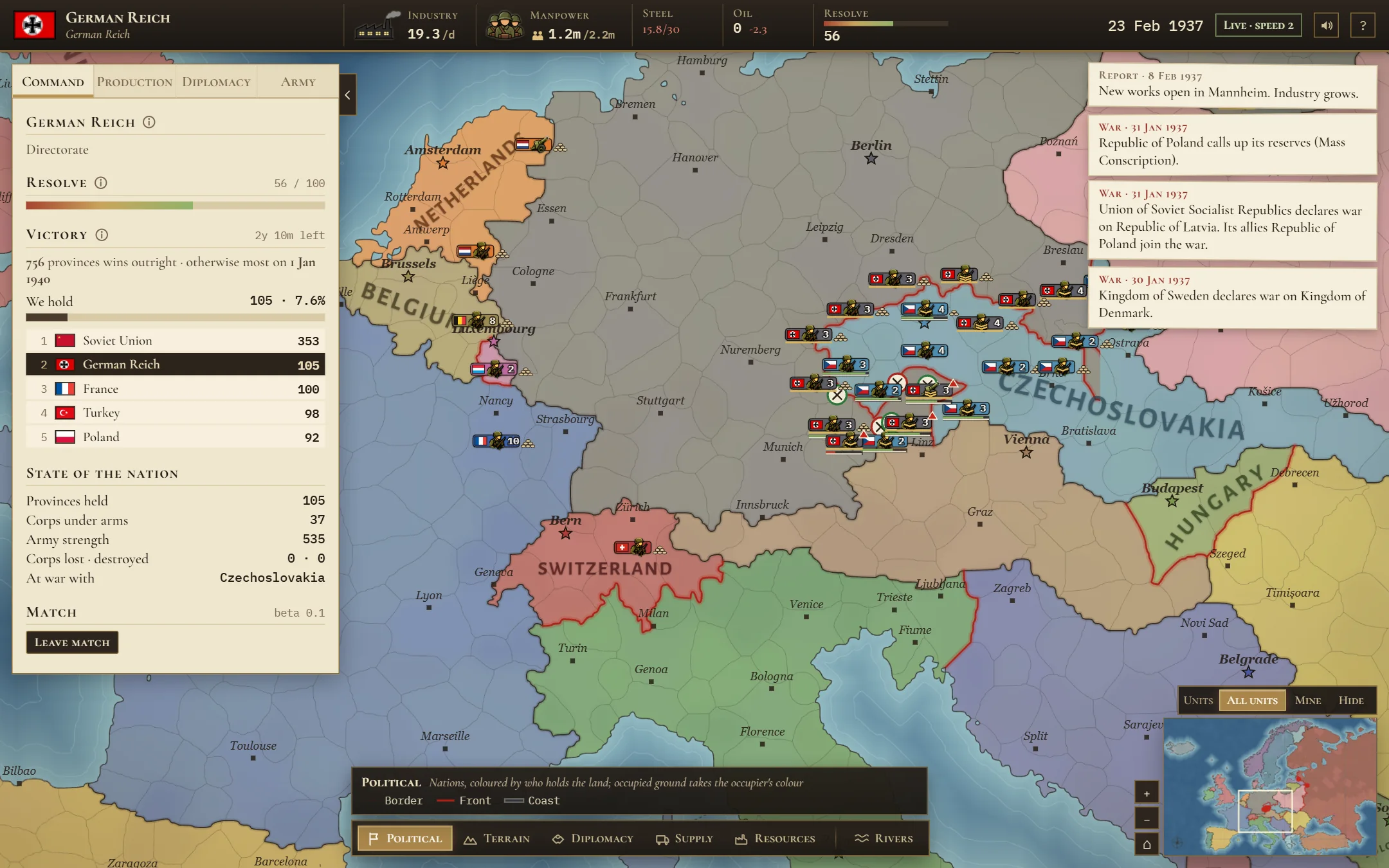 1234
- A battle. A round seal with a cross marks it. A green ring means your side is winning; a red ring means it is losing. A plain ring is a battle between other countries.
- A red triangle: corps cut off from supply.
- A red line is a front: a border between countries at war.
- Your corps pressing on the front.
- Frontage. Only a few corps can fight in one battle at a time: 3 or 4 on each side on open ground, and 2 in mountains or marsh. The rest wait behind as a reserve and step in as the first ones tire.
- Attack from more than one side. Each extra side you attack from lets more of your corps fight at once.
- Most battles last a couple of days. Hard ones, against dug in corps in a city or the mountains, can go on for a month.
- When you win and march in, the province becomes yours and takes your colour. If it belonged to an ally, it goes back to them.
8. Field commands: the Army tab
You do not have to move every corps yourself. Your corps are grouped in commands, and each command has a general who moves its corps every day, following the orders you give. Every corps starts in I Command, which guards all your borders on its own.
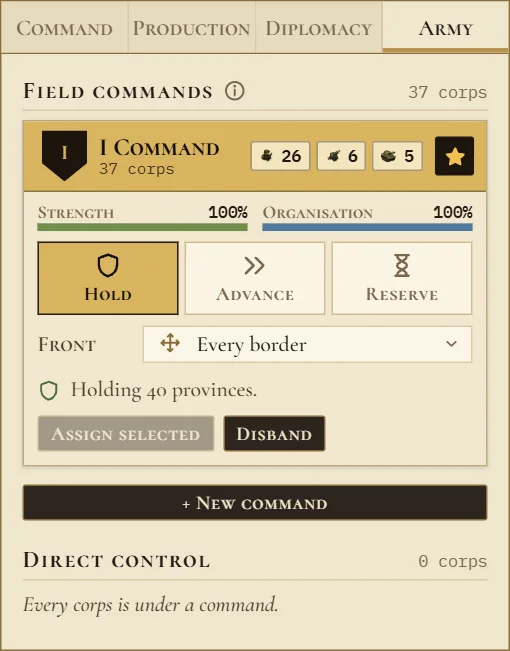 123456
- A command: its name, how many rifle, gun and armored corps it has, and its strength and organisation. If you star a command, new corps join it; with no star, they start under your direct control.
- Hold: man the front, dig in, and win back your own lost provinces. A command on Hold never crosses into enemy land otherwise.
- Advance: attack wherever it has the edge, massing on one point. Pick an objective province to aim the push.
- Reserve: wait at a base behind the lines and rush to any part of the front that is breaking.
- Line: hold exactly the provinces you draw on the map. The corps spread along the line, more of them where the enemy is, and dig in. If a province of the line falls, they win it back, but they never go past the line. Press Line on a command, then hold the right mouse button and drag across your provinces (or click them one by one), and press Done. On a phone, tap the provinces instead.
- Front: which border, or which enemy, this command faces.
- New command: make a new command from the corps you have selected.
Posture sets how boldly the general attacks. Cautious attacks only with a clear edge (1.6 to 1) and fresh corps. Balanced attacks with a fair edge (1.25 to 1) and keeps the line straight. Bold attacks even when outnumbered and with worn corps, and drives deep: fast, and costly.
Hold Shift and press 1 to 9 to select a command quickly.
9. Production: the Production tab
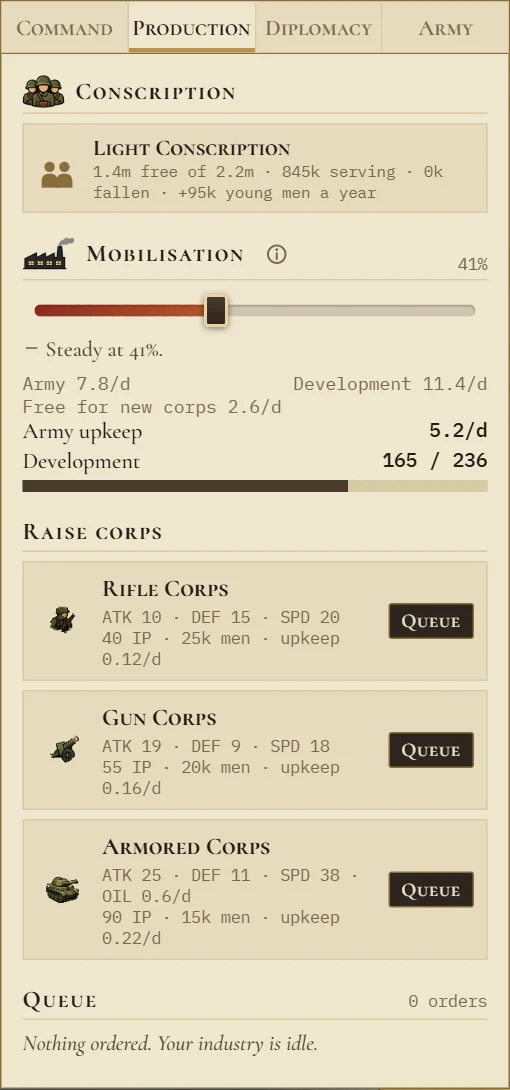 12345
- Conscription: your law and your manpower. See Manpower and conscription.
- Mobilisation. This slider splits your industry between the army and development. The army share pays for your corps and builds new ones. Development grows your industry for good and fills your development fund, which pays for forts and investment. Factories change over slowly: about 10 points a month toward the army, and 15 a month back.
- Raise corps: the three kinds of corps, with their cost (IP means industry points), their men and what they cost to keep.
- Queue orders one. It goes to the end of your queue.
- Your queue: the corps being built, in order. You can make an order repeat, or cancel it. A queue holds 30 orders at most. New corps start under your direct control, unless you have starred a command for them to join.
Every corps you have costs a little industry each day, so a bigger army leaves less for new corps. Short of steel, your industry slows. Armored corps also need oil.
10. Manpower and conscription
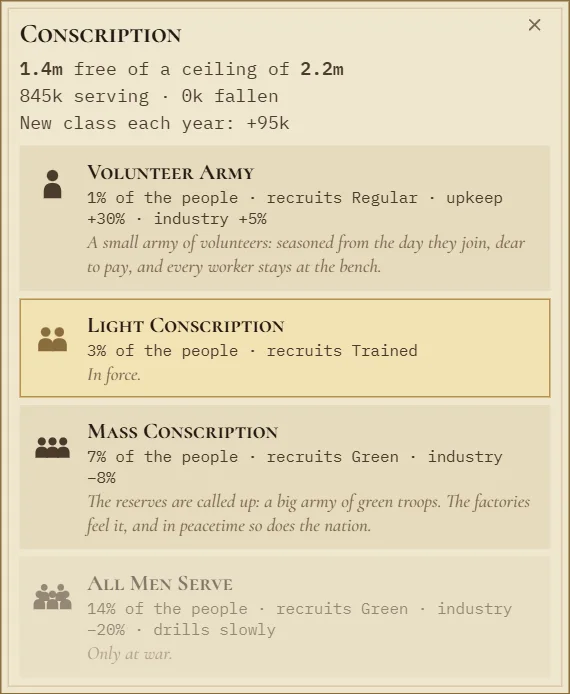
Every corps needs men. Your conscription law sets your ceiling: how many people your country can put in uniform.
- Volunteer Army: 1% of the people. Recruits arrive well trained (Regular), but cost 30% more to keep, and your industry gets 5% more.
- Light Conscription: 3%. Recruits arrive Trained.
- Mass Conscription: 7%. Recruits arrive Green, and your industry is 8% lower. Only at war, when someone is preparing war on you, or when you have a war goal yourself. A Directorate or Syndicate government may use it any time.
- All Men Serve: 14%. Raw recruits who train slowly, and 20% less industry. Only at war. A Commonwealth can only use it once its homeland is invaded.
- A new law takes 30 days to come in. After lowering it, you must wait 60 days before raising it again.
- Every man you ever raise counts against the ceiling for good, including the fallen.
- Each year a new class of young men comes of age and refills it a little.
11. Diplomacy and war
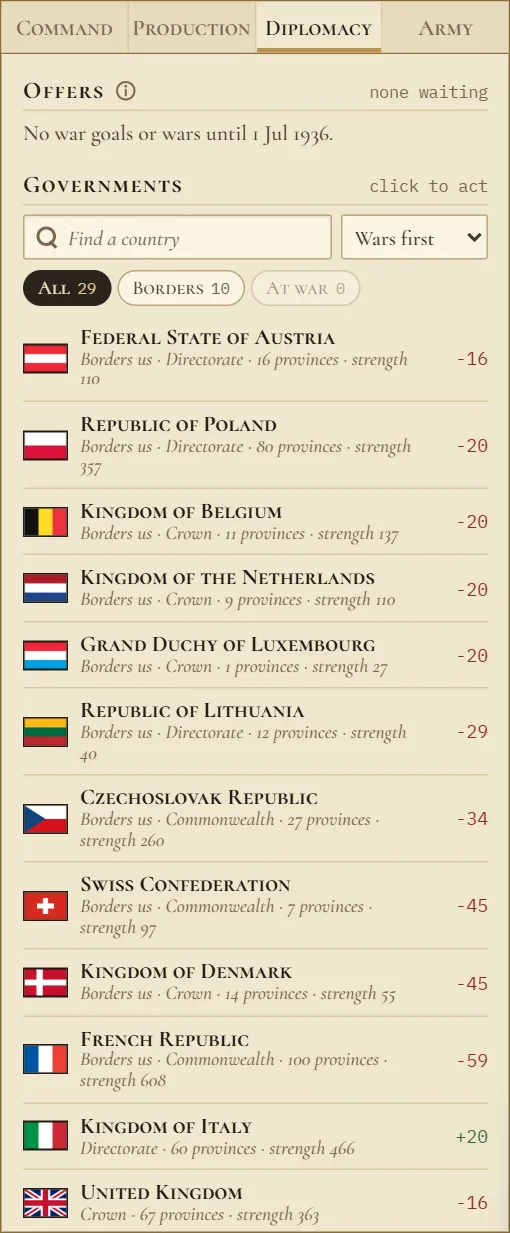 1234
- Offers: those waiting for your answer, and those you sent.
- Find a country by name.
- Filters: every country, only your neighbours, or only those at war with you.
- A country. Click it to open its actions. The number on the right is your relation with it, from minus 100 (hatred) to plus 100 (friendship).
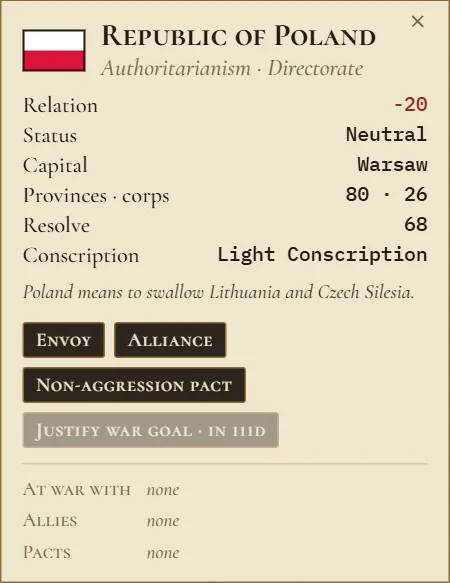 12345
- Relation.
- Envoy raises your relation by 8. One envoy every 45 days, up to plus 50.
- Alliance: if any member is attacked, all members go to war. Allies form one group, so allying with a country also allies you with its allies. Countries at war with each other can never be in the same alliance. On an ally's card this button becomes Break alliance.
- Non aggression pact: for a year, neither of you may justify a war goal against the other, so neither can declare war. Either side can end it at any time with End pact, but it still holds for 30 more days, and the other side is told straight away. If you attack a country whose ally has a pact with you, that ally stays out of the war.
- Justify war goal: you need a war goal before you can declare war. Grey during the opening peace.
Offers
An alliance or a pact is an offer the other side accepts or declines. Computer countries answer in a few days; a human player has 30 days. You can ask each country for each kind of treaty once every 90 days.
How a war starts
- First comes the opening peace: until 1 July 1936 nobody can justify a war goal or declare war.
- Then justify a war goal against a country. It takes 30 days, and they will see it coming. The crossed swords in your top bar count the days.
- When it is ready you have 30 days to declare war, or the war goal lapses. You can only have one war goal at a time.
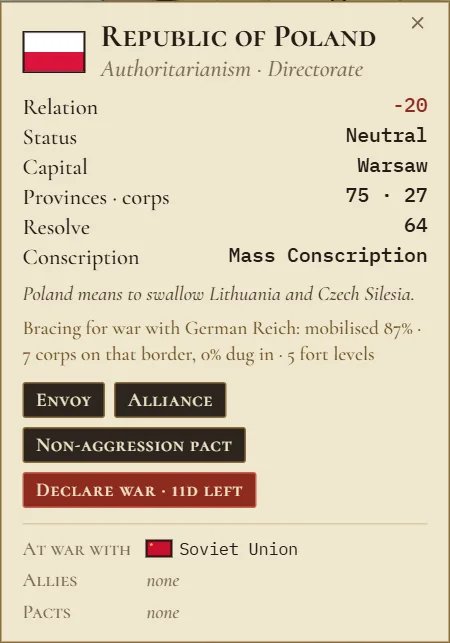 1
- Declare war, with the days left before your war goal lapses.
- When you declare war, the allies of the country you attack join the war against you.
- You cannot declare war on a country you have a pact with. Declaring war on a country you have a truce with costs resolve.
How a war ends
- White peace: both sides keep what they hold today, then a one year truce. Offer it from your enemy's card. Between the leaders of the two sides it ends the whole war. Between anyone else, only those two make peace and the rest fight on.
- Surrender: a beaten country may offer to surrender. Accept it, and every province of theirs that you hold becomes yours.
- Capitulation: a country at war that holds none of its land any more, because every province is occupied, capitulates at once. Each occupier keeps what it holds. This goes for players too: lose your last province and your country falls.
- Otherwise nobody ever signs you out of a war. Every peace is your choice.
12. Map modes
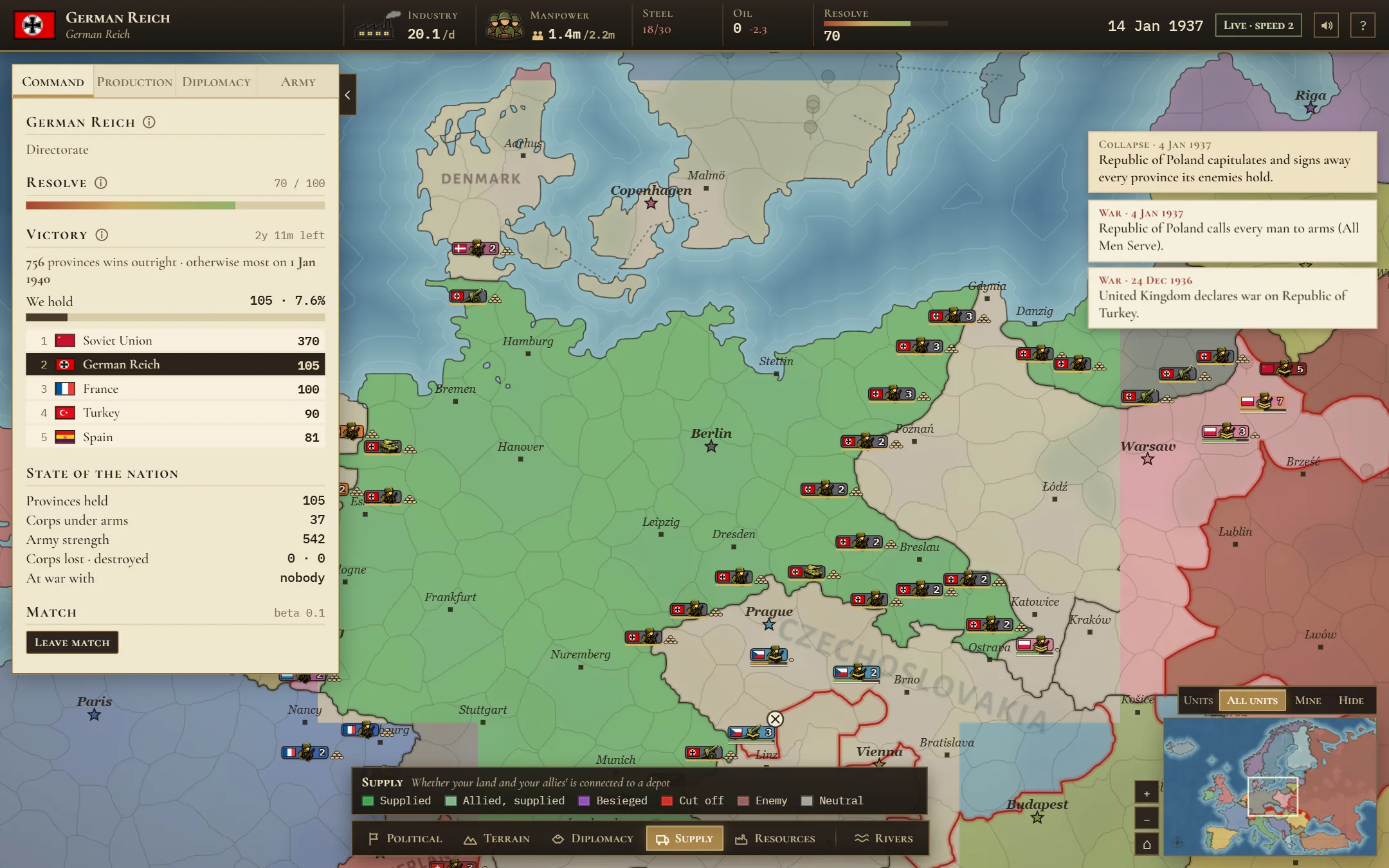 1
- The legend says what each colour means in the mode you picked.
- Political: who holds the land. Land taken in a war takes the colour of whoever holds it.
- Terrain: the ground itself, and what it does to a battle.
- Diplomacy: how every country stands with you.
- Supply: whether your land and your allies' land is connected. Green is supplied, purple is besieged, red is cut off.
- Resources: industry, steel and oil.
- Rivers turns the river lines on or off.
The M key goes to the next map mode, and R turns rivers on or off.
13. Fair play
- One person plays one country. No cheating, and no bots or tools that play for you.
- No spamming the chat, flooding the server, or opening tabs you do not play. Up to 8 people on one home network can play at once. Spammers are banned automatically, usually for 30 days, and a ban covers the whole network.
- In a lobby, pick a country within 3 minutes or you are removed.
- In a match, if you give no orders for 10 minutes, you are removed and the computer takes over your country.
- If you leave a match, or your connection drops, you cannot come back. The computer takes over your country.
- Names are letters only, and nothing hateful or rude.
The full rules are in the terms and privacy.
14. All the controls
Mouse and keyboard
| Do this | To |
|---|---|
| Click a stack | select it |
| Shift and click | add a stack to the selection |
| Shift and drag | select everything inside a box |
| Double click a stack | select its whole command |
| Right click a province | move there, or attack it at war |
| Right click a country | open its diplomacy card (with nothing selected) |
| Hold the right button and drag across provinces | draw a defensive line for the selected corps |
| H | take the selected corps out of their command |
| Esc | clear the selection |
| Shift and 1 to 9 | select a command |
| Drag, W A S D, arrow keys | move the map |
| Mouse wheel | zoom |
| M | next map mode |
| U | which units are shown |
| C | unit colours: friend or foe, or each nation's own |
| R | rivers on or off |
| Tab | hide or show the side panel |
| Enter | open the match chat (Esc closes it) |
| F1 | the short help |
Phone
| Do this | To |
|---|---|
| Tap a stack | select it |
| Tap a province | move there, or attack it at war |
| Hold another stack | add it to the selection |
| Double tap a stack | select its whole command |
| Hold the selection bar | take the corps out of their command |
| Hold a country | open its diplomacy card (with nothing selected) |
| Line in the selection bar, then tap provinces | draw a defensive line for the selected corps |
| One finger | move the map |
| Two fingers | pinch to zoom |
| Menu button | open the side panel |
The game is best played with the phone turned sideways.
15. Tips for your first match
- Use the six months of peace. Queue corps, choose your conscription law, send envoys and look for allies.
- Watch for the warning sign in the top bar. Someone is preparing war on you: fill that border, let your corps dig in, build forts there and look for allies.
- Let your commands do the work. Keep one command on Hold for your borders, and give another the Advance order with an objective when you go to war.
- Attack from two sides at once, and avoid attacking into mountains, cities or across rivers when you can.
- Keep your corps in supply, and do not crowd too many into one province.
- A war goal warns your target for 30 days. Have your army ready before you start one.
- Do not let your Resolve fall too low. Take land, and make peace when a war goes badly.